Your Questions, Answered
We’ve assembled the most frequently asked questions about Eversense into one place. Got a question that you can’t find the answer to? Contact us.
Pinch in and out on the screen to display different day/time ranges on the trend graph. You can view as few as 3 hours or up to 3 days of information on the My Glucose screen.
You can view the trend graph in either portrait or landscape mode. In landscape mode, there are shortcut buttons to see 7, 14, 30 and 90 day views and to email the graph.
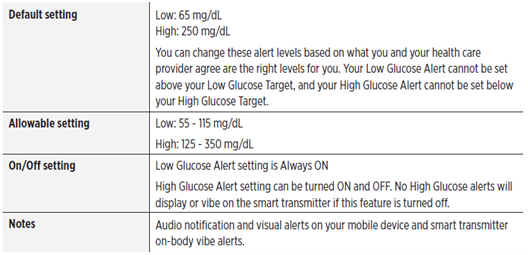
Yes. Your Eversense® 365 CGM System will alert you when your glucose levels are outside the alert settings you choose. When you have reached your low and high glucose alert levels, the smart transmitter vibrates, and the mobile app gives an audible alert as well as displays a message on the screen. You should immediately perform a finger stick blood glucose test before making a treatment decision.
Multiple event icons can be added for the same time period.
When traveling, your smart transmitter and sensor are safe to go through airport security without removing them. You may inform security that you have an implanted medical device.
Your smart transmitter will automatically sync to your smartphone’s current time and date when time zones are changed. You should allow for automatic syncing or manually change the time zone (not the time) if needed.
The Eversense® 365 CGM System is safe for use on U.S. commercial airlines. The Eversense® 365 Smart Transmitter is a Medical Portable Electronic Device (M-PED) with emission levels that meet FAA mandates for use in all modes while in flight. (Reference FAA Advisory, Circular #21-16G, dated 6.22.2011.) To use, turn your mobile device’s Bluetooth® feature on after you have put your mobile device in airplane mode. For flights outside the US, follow local security regulations for use of medical devices in flight.
Eversense® data is sent to other apps in the unit of measure you selected when you set up your Eversense® account. The Apple Health app will convert to the Unit of Measure that is set in the Apple Health app.
From the Blood Glucose section within the Apple Health app, you can change the Unit on the bottom of the page. The options shown are mg/dL and mmol/L. The unit of measure commonly used in the United States is mg/dL.
Apple Health app states: Make sure this unit matches what is being used by your measurement device.
The smart transmitter is incompatible with magnetic resonance imaging (MRI) procedures. The smart transmitter is MR Unsafe and MUST BE REMOVED before undergoing an MRI (magnetic resonance imaging) procedure.
The system is contraindicated in people for whom dexamethasone or dexamethasone acetate may be contraindicated.
Mannitol or sorbitol, when administered intravenously, or as a component of an irrigation solution or peritoneal dialysis solution, may increase blood mannitol or sorbitol concentrations and cause falsely elevated readings of your sensor glucose results. Sorbitol is used in some artificial sweeteners, and concentration levels from typical dietary intake do not impact sensor glucose results.
Still have questions?
The Eversense team is dedicated and ready to provide the answers and support you need. Simply click the link below.
The Eversense® 365 Continuous Glucose Monitoring (CGM) System is indicated for continually measuring glucose levels for up to one year in people (18 years and older) with diabetes. The system is indicated for use to replace fingerstick blood glucose (BG) measurements for diabetes treatment decisions. Fingerstick BG measurements are required for calibration one time a week after day 13, and when symptoms do not match CGM information or when taking medications of the tetracycline class. The sensor insertion and removal procedures are performed by a health care provider. The Eversense 365 CGM System is a prescription device; patients should talk to their health care provider to learn more.
For important safety information, see bit.ly/eversensesafety
Eversense, Eversense 365 Continuous Glucose Monitoring, and the Eversense logo are trademarks of Senseonics, Incorporated. All other trademarks are properties of their respective owners and are used solely for informative purposes. No relationship or endorsement should be inferred or implied.
Apple Watch® is a product of Apple, Inc., and may be separately purchased from an authorized Apple retailer. Apple Watch is not included with the Eversense CGM System. Android is a trademark of Google LLC.
MKT-001692 Rev 1


 Call My Eversense Specialist Now
 Schedule a Call